Documentation
Everything you need to build and scale your visual backend.
Introduction
Backly is a professional visual workspace for engineers to build, simulate, and export enterprise-grade backends — without writing boilerplate. Design your logic visually, download clean production code in Node.js or PHP, and deploy anywhere.
Production-Ready Code
MVC patterns, clean architecture, and zero magic — code you can read and own.
Instant Simulation
Test your logic in a sandboxed environment before writing a single line.
Visual Logic Builder
Drag-and-drop 40+ blocks covering every backend operation imaginable.
Multi-Stack Export
Export the same project as Node.js or PHP with one CLI command.
Getting Started
1. Create a Project & Define Your Schema
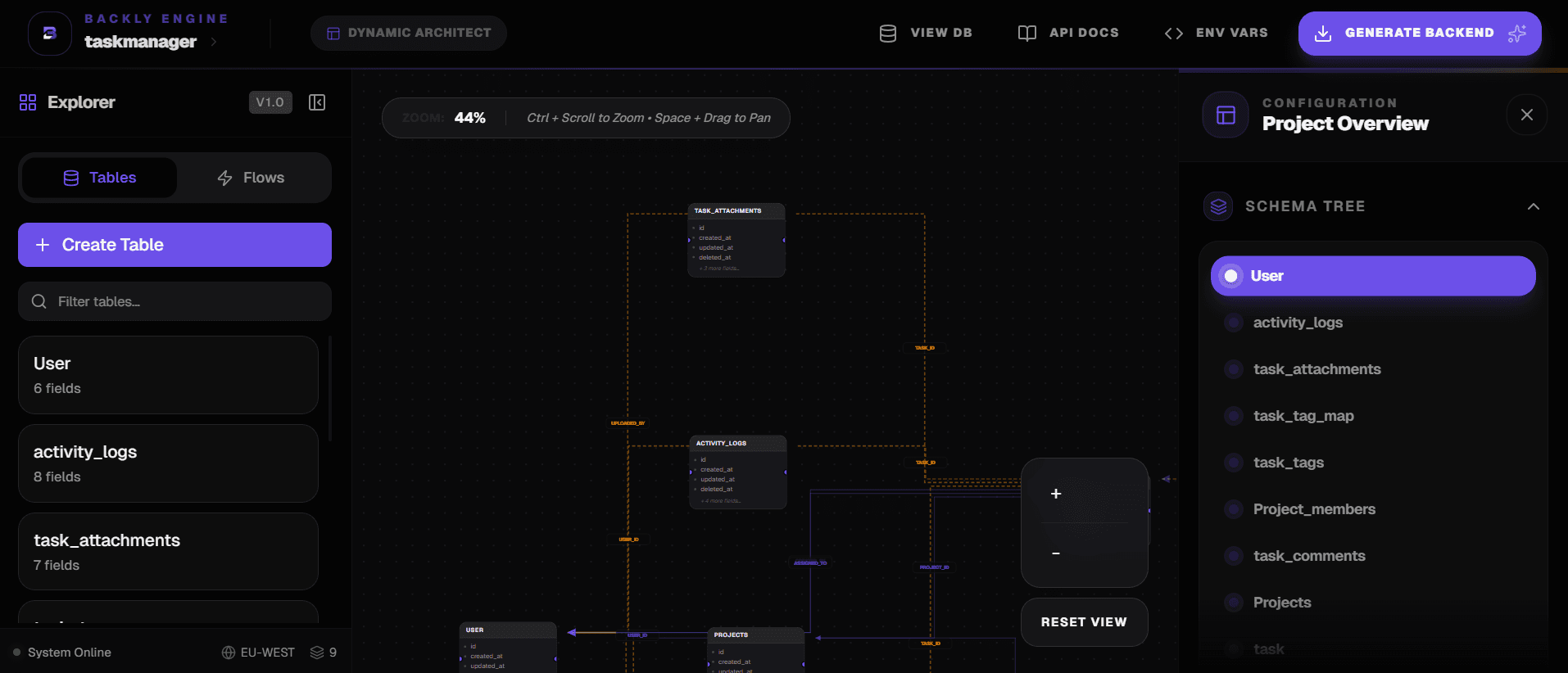
After signing up, create a new project. Head to the Schema Builder and add your tables. For each table define fields, data types (string, integer, boolean, timestamp…), and constraints (Not Null, Unique). Wire up relationships — One-to-Many or Many-to-Many — with a few clicks. Backly tracks foreign keys and exposes them automatically in your logic blocks.
2. Create Controllers & Routes
In the Controllers panel, add a controller (e.g. UserController) and define routes inside it. Pick the HTTP method (GET, POST, PUT, DELETE), set the path (e.g. /users/:id), and declare your request fields — body params, URL params, or query strings. These fields become available inside the Logic Builder.
3. Build Logic with Drag-and-Drop Blocks
Click Edit Logic on any route to open the Logic Builder. Open the Logic Engine panel on the right, choose a category, and drag blocks into the workspace. Blocks execute top-to-bottom. Configure each block by clicking it — map request fields, set filter conditions, and chain operations together.
- Database — CRUD & queries
- Control — branches & loops
- Response — send JSON back
- Security — JWT, hash, encrypt
- Transform — assign & expressions
- External — email, SMS, HTTP
4. Simulate & Test
Click Try it out on any route to open the built-in Swagger UI. Fill in test values and hit Execute. The Simulation Engine runs your blocks in a sandboxed environment and returns real logs showing exactly which block executed, what the database query looked like, and the final HTTP response.
5. Export & Deploy
Run backly sync in your terminal to pull the generated code into your local project. Switch stacks any time with backly switch php or backly switch node. Deploy the output like any standard backend.
Database Blocks
All database blocks operate on the tables you defined in the Schema Builder. Each block lets you map request fields, session variables, or static values to database columns via the Variable Mapping panel.
How Tables Are Organised in the Selector
Every database block (FindOne, FindMany, Create, Update, Delete, Count) contains a Target Table dropdown. Tables are automatically organised into four categories so you always know why a table is available:
The primary table tied to this controller (e.g. a ProductController's base table is products). Querying this table is a direct, standalone lookup — no joins needed.
Tables with a direct FK relationship to the base table (depth 1). For example, if products belongs to categories, then categories appears here. Selecting it generates a join through the defined relationship.
Tables reached through two hops (depth 2). For example, if products → orders → shipments, then shipments is nested under orders. The generator creates the appropriate multi-level join chain automatically.
Any table in your schema that has no defined relationship with the base table. Selecting it performs a completely independent, standalone query — no join is implied. Use this for cross-domain lookups.
Create Record
Inserts a new row into the selected table.
Select the target table
users).Map fields
Store the result
newUser) to use in later blocks.Find One Record
Fetches a single row matching your filter conditions.
Pick the table
Add filter conditions
Configure the result variable
user). If no record is found the variable is null — use an If block after to handle that case.Find Many Records
Returns a list of records. Supports pagination, ordering, and deep filters.
Choose table & filters
Set ordering and limit
Advanced AND/OR grouping
Update Record
Updates one or more rows that match filters.
Define the WHERE clause
Map updated values
Delete Record
Deletes rows matching the filter. Always add a WHERE condition to avoid wiping the whole table.
Add a WHERE condition
id = req.params.id).Check affected rows
Count Records
Returns the number of rows matching optional filters. Useful for pagination totals or existence checks.
Optional WHERE
Use the result
Control Flow Blocks
If / Else
Branches your logic based on a condition. The TRUE branch executes when the condition passes; otherwise the FALSE branch runs.
Add a condition
user), choose an operator (= / != / > / is null…), and set a comparison value.Build the TRUE branch
Build the FALSE branch
Switch
Multi-branch conditional. Compares a single variable against multiple values and routes to the matching case.
Set the switch value
req.body.role).Add cases
Add a default
Loop
Iterates over an array variable and runs the inner block chain for each item.
Select the source array
Name the loop item
item).Add inner blocks
Transaction
Wraps multiple database operations in a single atomic transaction. If any block inside fails, all changes are rolled back automatically.
Drag DB blocks inside
Auto rollback on failure
Parallel
Runs multiple block chains simultaneously (Promise.all). Use this when two operations are independent and you want to save time.
Add branches
Fill each lane
Results are available after
Rate Limit
Throttles requests to protect your endpoints from abuse. Automatically returns 429 Too Many Requests when the limit is exceeded.
Set the window
Set the max requests
Place it first
Response Blocks
Response blocks terminate the current execution branch and send an HTTP response back to the client. Every logic path must end with one of these.
Send Response
Sends a custom JSON response with any status code.
Set the status code
Build the JSON body
user.name).Success Response
Shorthand for a 200/201 success response. Automatically wraps data in a standard success envelope.
Choose the data variable
Set an optional message
Error Response
Terminates the request with an error status code and message. Typically placed in the FALSE branch of an If block.
Set the error code
Write a message
Transform Blocks
Assign Variable
Creates a new named variable from an existing variable, request field, or static value. Think of it as const x = ....
Name your variable
userId or expiresAt.Set the value source
user.profile.id).Expression
Evaluates a JavaScript expression and stores the result in a variable. Use for calculations, string formatting, and conditional values.
Write your expression
req.body.price * 1.2 or user.firstName + ' ' + user.lastName.Reference any variable
Name the output
Type Conversion
Converts a variable from one data type to another — string to integer, integer to boolean, etc.
Select the source variable
Choose the target type
Store the result
Array Blocks
Perform operations, mutations, functional transformations, and inspections on array collections.
Array Length
Gets the number of elements in an array and stores the integer count in a target variable.
Select the source array
Store the length
totalCount).Mutation (Push, Pop, Shift, Unshift)
Add or remove elements from the start or end of an array.
Push & Unshift
push) or beginning (unshift) of the array.Pop & Shift
pop) or first item (shift).Functional Iterators (Filter, Find, Map)
Filter matching elements, find the first match, or map/transform array items into a new collection.
Find & Filter
Map
Search & Utility Methods
Check membership (includes), find index (indexOf), test condition predicates (some, every), join to string, slice sub-arrays, or concat multiple collections.
Security Blocks
Hash
One-way hashes a value using bcrypt. Perfect for storing passwords securely.
Select the value
req.body.password).Set salt rounds
Store the hash
hashedPassword) and pass it into your create block.Compare (Hash Check)
Compares a plain-text value against a stored hash. Returns true or false. Used for login password verification.
Set the plain value
req.body.password.Set the hash
user.password).Check the result
Generate JWT Token
Signs a JWT token with a secret key. Used after successful login to issue access tokens.
Add payload fields
user.id, user.role).Set expiry
7d, 1h, or 30m.Store and send the token
Verify JWT Token
Decodes and validates a JWT. Typically placed at the top of protected routes.
Set the token source
req.headers.authorization (Bearer token).Store the decoded payload
decoded.userId) are available downstream.Handle invalid tokens
Encrypt & Decrypt
Two-way AES encryption for sensitive data like API keys or personal info that must be retrievable later.
Encrypt
Decrypt
Generate Code
Generates a random numeric or alphanumeric code. Useful for OTPs, verification codes, or temporary passwords.
Set the length
Choose format
Store and use it
External & Storage Blocks
Send Email
Sends a transactional email via your configured email provider.
Set recipient
to to a request field or variable (e.g. user.email).Write the subject & body
Send SMS
Sends an SMS message via your configured SMS provider (e.g. Twilio).
Set the phone number
Write the message
HTTP Call
Makes an outbound HTTP request to any external API.
Set method & URL
Add headers & body
Authorization and body fields from your variables.Store the response
Log
Writes a structured log entry. Visible in the Simulation Logs panel during testing.
Pick the log level
Write a message
File Store
Uploads and stores a file to your configured storage provider.
Set the file source
Set storage path
Use the URL
File Delete
Removes a previously stored file by its path or key.
Set the file path
Utils Blocks
Utils contains three sub-modules: Time, String, and Math. Each block takes input variables and outputs a new computed variable.
Time
time.now— current timestamptime.addMinutes— add minutes to a datetime.addHours— add hourstime.addDays— add daystime.diff— difference between two datestime.format— format to string (ISO, custom)time.compare— compare two dates
String
string.uppercase— convert to UPPER CASEstring.lowercase— convert to lower case
Select the source variable and name the output. Result is a new string variable.
Math
math.add— a + bmath.subtract— a − bmath.multiply— a × b
Each takes two numeric inputs (variables or static values) and returns a number.
Simulation Engine
Test your entire backend logic without deploying anything. The simulation engine executes your visual blocks against an in-memory database.
Open the Swagger UI
Fill in test values
Execute
Read the Simulation Logs
Iterate
Architecture & Export
Backly generates a standard MVC Architecture — clean, readable, and deployable as-is.
"We generate code that feels hand-written by a senior engineer, following the most battle-tested architectural patterns."
Backly CLI
The CLI syncs your visual workspace with your local dev environment. No manual downloads, no copy-pasting.
Installation
npm install backly-cliAuthentication
backly loginPulls the latest generated code from your Backly workspace into the current directory. Run inside a project folder containing backly.json.
Migrates your local project from one stack to another while preserving custom business logic.
backly help to see all available commands and options.Ready to build?
Start building your enterprise-grade backend today with Backly.